Wix dropshipping lets you build an online store without buying and storing inventory upfront, making Wix one of the more accessible dropshipping platforms for beginners and small businesses that want control over their storefront. To make it work, however, you need more than a good-looking Wix store. You need a focused niche, reliable suppliers, data-backed product research, clear pricing, optimized product pages, and an efficient fulfillment workflow.
This guide explains how to successfully run a dropshipping business using Wix, from setup to scaling. It is designed for beginners, small businesses, and existing Wix users who want to start dropshipping without managing a warehouse.
You’ll learn how to set up your Wix ecommerce website, connect Sell The Trend, find and validate products with NEXUS AI, evaluate suppliers, import products with one click, automate inventory and fulfillment, and market and scale your store.
No title
💡Pro Tip: According to Grand View Research, the global dropshipping market is worth over $580 billion. That scale creates opportunity, but it also creates competition. Success with Wix dropshipping depends on making better decisions about what to sell, which suppliers to trust, how much to charge, and how efficiently you operate.
Key Takeaways
Wix dropshipping is a practical option for beginners and small businesses that want creative control over an online store without managing their own warehouse.
Product research should come before product importing. Evaluate demand, competition, supplier cost, shipping times, and margin potential first.
Good dropshipping suppliers are essential because quality, stock availability, shipping, and communication directly affect customers.
Connect Sell The Trend to Wix early in the setup process so NEXUS AI product research, Store Intelligence, supplier research, one-click product importing, inventory synchronization, and fulfillment can work as one connected workflow.
Strong product pages, SEO, social media, email campaigns, paid ads, customer feedback, and analytics are all important after launch.
You can use Wix as the storefront for a dropshipping business: build and customize the site, accept customer payments, manage your catalog, create product pages, and connect tools for sourcing, importing, inventory management, and fulfillment. Pairing Wix with Sell The Trend extends that storefront into a connected product-research and operations workflow.
Retailers using dropshipping do not own the inventory they sell.
Instead, the merchant lists products on an ecommerce website, decides on the retail price, markets those products to potential customers, and manages the customer relationship.
In dropshipping, suppliers ship products directly to customers.
No title
💡Pro Tip: When a customer places an order in your Wix store, the supplier receives the order details, prepares the product, and ships it.
How Does the Dropshipping Model Reduce Startup Costs?
Dropshipping requires minimal upfront investment. You don’t need to manage inventory or warehousing costs. That is one reason the dropshipping model appeals to small businesses. Instead of committing large amounts of cash to products before knowing whether they will sell, merchants can test demand first.
Dropshipping lets sellers focus on marketing and customer service and offers a wide selection of products without storage limits.
That flexibility does not mean you should add everything you can find. A focused store with validated products is usually easier to position and market than a catalog containing hundreds of unrelated items.
Why Do Dropshippers Choose Wix?
Dropshippers choose Wix because it combines website design, ecommerce functionality, product management, payments, and an app ecosystem in one platform. Wix is especially relevant for small businesses that want to start selling without coding a site from scratch while still maintaining strong creative control over the customer-facing store.
Pairing Wix with Sell The Trend extends that design-first experience into a more streamlined dropshipping workflow. Wix handles the storefront and customer-facing experience, while Sell The Trend adds NEXUS AI product research, supplier intelligence, Store Intelligence, one-click product importing, live inventory and order updates, and fulfillment tools. This gives Wix store owners a clearer path from product discovery to day-to-day operations without relying on as many disconnected systems.
Wix is beginner-friendly and design-focused for dropshipping and offers over 500 store templates. These give small businesses a starting point, but the finished Wix site should still look distinct. Colors, typography, navigation, photography, copy, and product pages should all support the same brand identity.
A distinct brand identity is crucial for dropshipping success on Wix. Dropshippers should focus on building a strong brand differentiator. A differentiator can be a narrow audience, a particular product angle, stronger educational content, better product presentation, a more carefully selected catalog, or a noticeably better customer experience.
No title
💡Pro Tip: When planning the layout, explore website ideas from established ecommerce brands in your niche. Look for familiar navigation and merchandising patterns, not to copy another business. You can also explore website ideas within Wix’s template collection before settling on the final structure.
How Much Does Wix Dropshipping Cost?
Wix can be relatively accessible to new merchants, but the Wix subscription is only one part of running an ecommerce business.
Wix plans start at $29 per month for dropshipping, and the platform requires a paid plan to accept payments.
Prices can vary by market, billing term, and future Wix pricing changes, so check the current plan details before publishing or purchasing. Wix plans start at $29 per month for dropshipping at the time of writing.
A new business may also have supplier costs, shipping fees, advertising expenses, payment-processing fees, samples, and app subscriptions.
Budgeting for all costs is essential when setting retail prices.
A product that costs $12 and sells for $30 does not automatically produce $18 of profit. Shipping costs, returns, paid ads, discounts, transaction costs, and software expenses can reduce the actual margin considerably.
What Do You Need to Start a Wix Dropshipping Business?
A Wix dropshipping store needs five fundamentals: a defined niche, products with measurable demand, solid suppliers, a trustworthy online store, and a repeatable system for importing, managing stock, processing orders, and supporting customers.
Dropshipping requires a strong niche and reliable suppliers.
Your dropshipping niche determines the potential customers you serve and which products belong together. For example, a pet-focused Wix store might sell grooming tools, travel accessories, feeding products, and enrichment items rather than mixing pet products with unrelated electronics.
No title
💡Pro Tip:Reliable dropshipping suppliers matter just as much as product selection. Supplier cost, quality, stock accuracy, shipping times, tracking, and communication all influence the experience your customer ultimately receives.
How Do You Set Up a Wix Dropshipping Store?
To set up a Wix dropshipping store, create your Wix ecommerce site, choose a design that fits your niche, configure payment and business settings, define shipping and return rules, and test the checkout experience. Once the storefront basics are ready, connect Sell The Trend before beginning product research so discovery, supplier evaluation, importing, inventory updates, and fulfillment can follow one connected workflow.
How Should You Design Your Wix Store?
Start with the customer, not the template.
The homepage should quickly communicate what the store sells and who it serves. Navigation should help potential customers reach categories, product pages, shipping information, contact details, and policies without having to hunt for them.
A focused dropshipping website generally benefits from a clear homepage, logical collections, an About page, contact options, policy pages, and uncluttered product pages.
Wix offers substantial creative control, but extra design elements are not automatically better. Prioritize readability, mobile usability, clear calls to action, and trust.
How Should You Build Your Product Catalog?
Organize catalogs effectively to improve discoverability.
Group related items logically and avoid adding products to make the online store look bigger.
A smaller catalog of validated items often produces a clearer customer journey than hundreds of unrelated products.
What Should You Configure Before You Start Selling?
Configure payment options, shipping rules, taxes where applicable, return policies, contact details, and store notifications before launch.
Depending on the customer’s location, account configuration, and Wix payment setup, supported payment options can include services such as Apple Pay.
Test the Wix dashboard and the customer-facing checkout instead of assuming the default configuration works exactly as expected.
No title
💡Pro Tip: Place a test order before you start selling. Review the product page, cart, checkout, confirmation messages, order processing, fulfillment, tracking, and mobile experience as a real customer.
How Do You Connect Sell The Trend to a Wix Store?
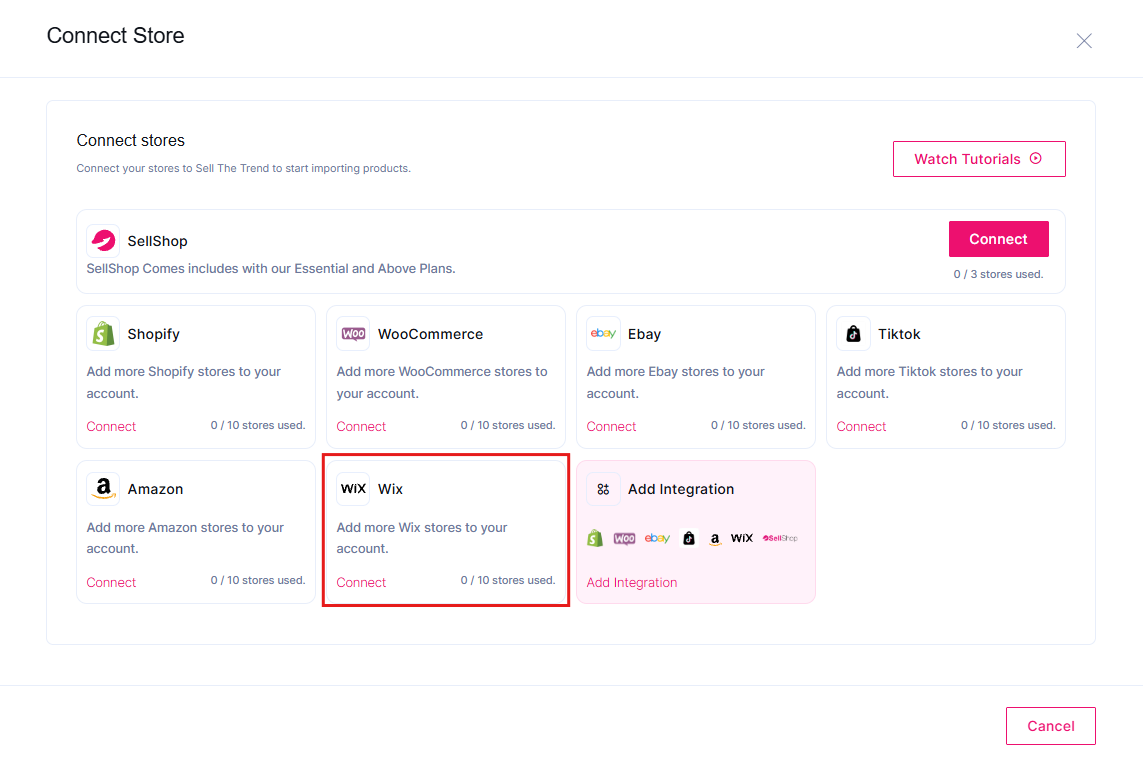
Connect your Wix store to Sell The Trend before you begin sourcing products. Once connected, Sell The Trend can move validated products directly into your Wix catalog, keep product information editable, synchronize inventory and order activity, and support fulfillment as orders come in.
This establishes the operating connection first, so everything from NEXUS AI product research to product importing can flow into the same Wix store.
After connecting your Wix store, you can move products discovered through Sell The Trend into the Wix product catalog instead of manually recreating every listing from scratch.
This makes it easier to start selling once you have validated the product and supplier.
How Sell The Trend Powers Your Wix Dropshipping Workflow
Once your Wix store is connected, Sell The Trend becomes the research and operations layer behind the storefront. NEXUS AI handles predictive product research, Store Intelligence helps you analyze competing stores, supplier tools help you compare sourcing options, and the Wix integration connects validated products with importing, live inventory and order updates, and fulfillment.
That means the next step is not randomly filling your Wix catalog. It is deciding which products deserve to be added in the first place.
No title
💡Pro Tip: Treat Wix as the storefront and Sell The Trend as a product-research and operational intelligence layer. Validate demand, competition, suppliers, shipping, and margin potential before you import products.
👉 Want to validate products before adding them to Wix? Start your 14-day free trial and use NEXUS AI to research demand, competition, suppliers, and margin potential.
How Do You Find Winning Products for a Wix Dropshipping Store?
Finding products should be a research process, not a guessing game. Look for products with evidence of demand, manageable competition, acceptable supplier cost, realistic shipping times, and enough room between total costs and retail price to support marketing, returns, and profit.
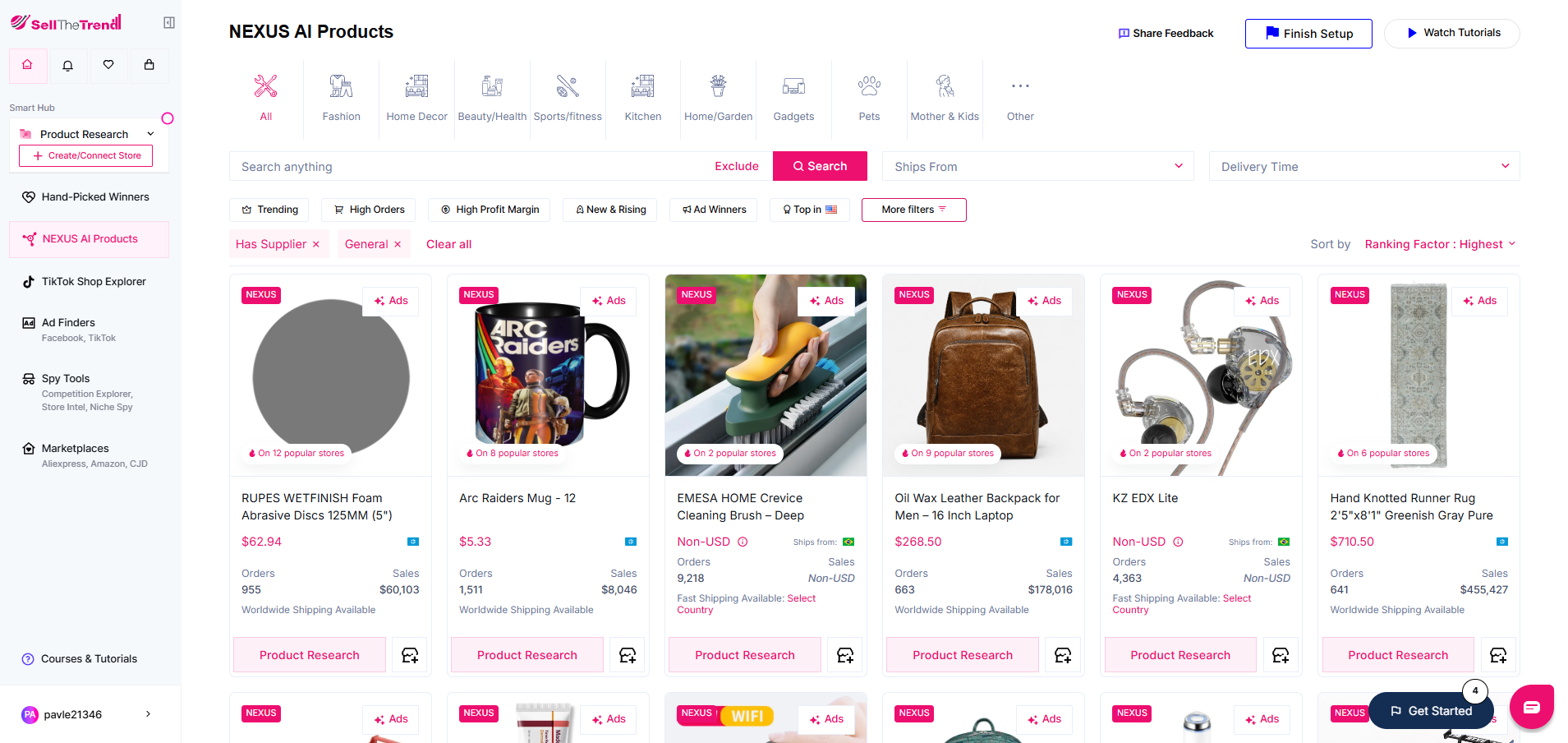
Sell The Trend’s NEXUS AI predictive product research gives you a more structured way to make that decision. It analyzes 26+ data points per product so you can compare product and market signals before deciding what belongs in your Wix catalog.
Trending products can be useful, but trend alone is not enough.
A product may be popular and still be a poor choice if the market is overcrowded, the shipping is unattractive, or paid ads consume the available margin.
Dedicated research tools can help small businesses narrow choices before importing products.
How Does NEXUS AI Help With Product Research?
NEXUS AI is Sell The Trend’s predictive product research system. It analyzes product and market signals to help merchants identify opportunities, evaluate competition, and compare potential products before adding them to a Wix store. NEXUS AI analyzes 26+ data points per product.
Rather than making manual marketplace browsing the primary discovery method, use product intelligence first.
A practical Wix dropshipping workflow looks like this:
Find products that fit your niche.
Review demand and trend signals.
Evaluate competition.
Compare supplier options.
Review supplier cost and shipping costs.
Estimate margin at the planned retail price.
Import only those products that meet your criteria.
Products can lose momentum. Review sales, product-page performance, conversion data, returns, and customer feedback to decide which items deserve more promotion.
What Should You Check Before You Import Products?
Before adding a product to your Wix store, check demand, competition, supplier reliability, shipping, cost, likely margin, and customer fit.
Use customer feedback to refine product offerings and enhance user experience.
Questions, reviews, refunds, and support messages often reveal issues that research alone cannot. If customers repeatedly ask about sizing, materials, delivery, compatibility, or instructions, improve the relevant product pages.
How Can Store Intelligence Improve Product Decisions?
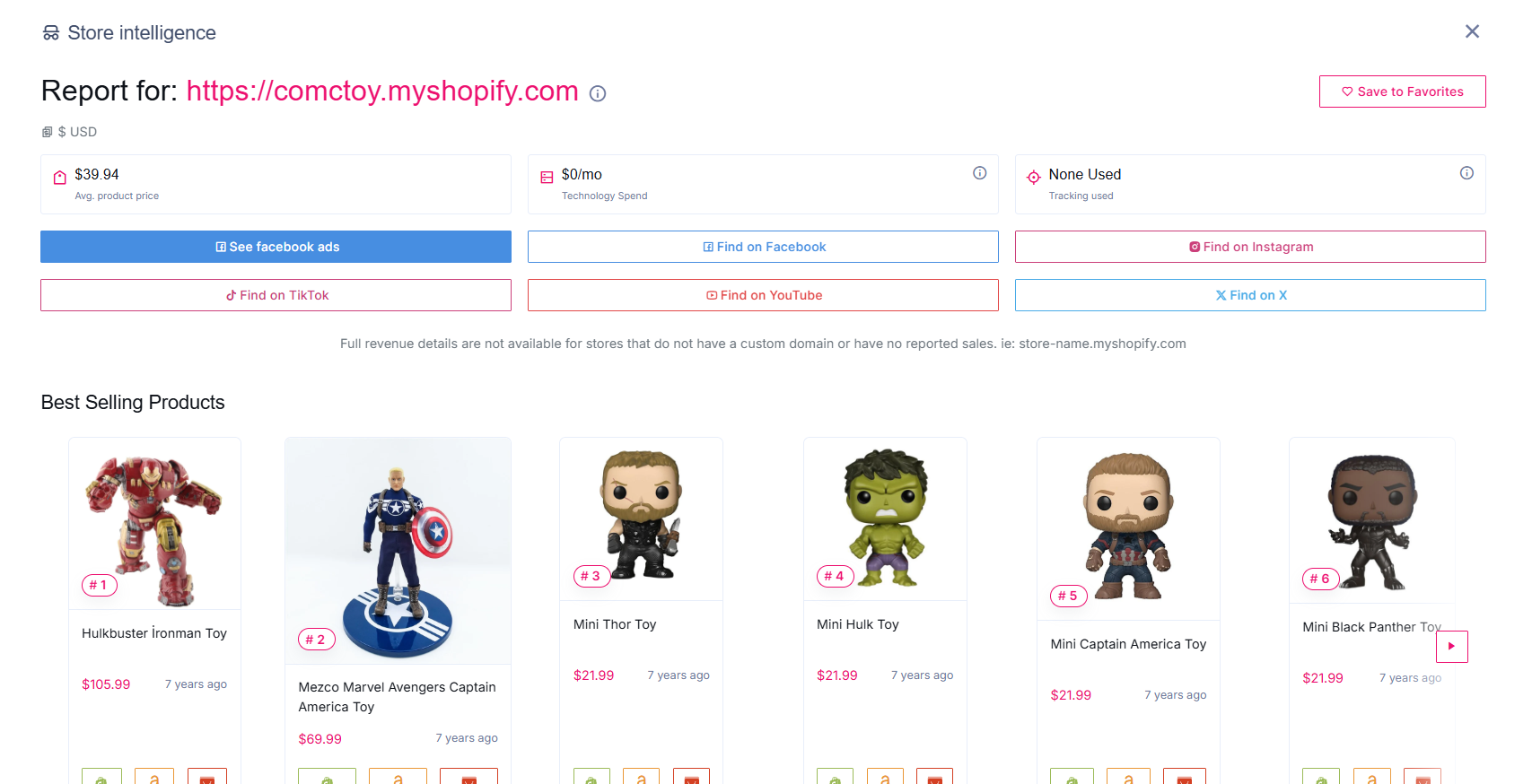
Store Intelligence can help you study what competing ecommerce stores are selling, including their product assortment and merchandising strategy.
This is useful for product validation, but competitor research should not become copying. Use the information to understand what appears to be working, where the market is crowded, and where you may have room to position your products differently.
That combination of NEXUS AI product discovery and Store Intelligence helps Sell The Trend function as a broader dropshipping platform, not just another product list.
How Do You Choose Reliable Dropshipping Suppliers?
Your suppliers should provide consistent product quality, reasonable shipping times, accurate stock information, clear pricing, usable tracking, and dependable communication.
Sell The Trend helps make supplier vetting more systematic by bringing supplier research into the same workflow as product discovery. Its supplier tools let you compare options using factors such as product quality, pricing, communication, and delivery speed, with supplier options from the U.S., Europe, and international markets.
After you validate a product with NEXUS AI, compare the available suppliers before importing it into Wix. The goal is to choose the strongest combination of product opportunity, supplier reliability, shipping, and cost rather than treating sourcing as a completely separate decision.
The cheapest supplier isn’t necessarily the best if delays, defects, or unavailable stock create refunds and customer-service problems.
Drop shipping relies on managing supplier relationships effectively.
A poor third-party supplier can damage an ecommerce business even when the Wix site itself is professionally built.
Should You Test Products Before Selling?
Yes. Order samples when practical, especially when using a new supplier or preparing to spend heavily on promotion.
Testing product quality before selling is a recommended best practice.
A sample lets you assess the product, packaging, shipping speed, and the customer experience.
It also gives you firsthand information to improve your product pages instead of relying entirely on supplier descriptions.
Why Do Shipping Times and Inventory Matter?
Shipping times directly affect customer expectations, refund risk, and repeat purchases.
Compare suppliers by delivery speed, cost, communication, and quality. Private or local suppliers may sometimes offer advantages when they operate closer to your primary customer base.
Supplier stock levels can change unexpectedly, causing order delays.
That is why managing stock with inventory management tools matters as the business grows.
A supplier directory or curated marketplace can simplify sourcing, but supplier management should still include ongoing performance checks.
No title
💡Pro Tip: Don’t select suppliers based on price alone. A slightly higher supplier cost may be worth it if the supplier provides more dependable stock, tracking, communication, and fast shipping.
How Do You Import a Validated Product Into Wix?
Once you have validated the product and selected a supplier, Sell The Trend lets you import the product directly into your Wix catalog with one click. Product information such as images, descriptions, variants, and other listing data can be transferred into Wix instead of being rebuilt manually.
The imported information remains editable, so you can adjust the title, copy, images, variants, pricing, and branding before publishing the product. Automation speeds up the listing process without removing your control over the final product page.
How Can You Import Products Manually Into Wix?
Wix lets you import products manually or via CSV files. Manual importing may work for a small catalog, but it becomes inefficient when you need to manage many titles, descriptions, variants, images, prices, and supplier changes.
That is where Wix dropshipping apps and external automation tools become more useful.
What Can You Edit After Importing Products?
Imported product information remains editable.
Review titles, descriptions, images, variants, pricing, and other listing information instead of publishing supplier content unchanged.
Optimize product descriptions to reflect unique branding and SEO.
Product pages should sound like your business, not like copied supplier listings. Rewrite generic language around buyer benefits, answer important questions, remove unnecessary content, and make relevant product and shipping details clear.
No title
💡Pro Tip: Automation should speed up publishing, not eliminate quality control. Review each important product page on desktop and mobile after importing it.
👉 Ready to connect research with your Wix store? Start your 14-day free trial, connect Wix, and import validated products without manually rebuilding listings.
What Are the Best Wix Dropshipping Apps and Tools?
The top Wix dropshipping apps depend on the tasks you need to handle. Some apps focus on supplier sourcing, while others specialize in importing, inventory management, order fulfillment, print-on-demand, marketing, or product research.
The Wix App Market includes supplier apps, automation tools, fulfillment services, and marketing extensions.
Before installing multiple dropshipping apps, map the functions your Wix store actually needs:
Product research
Supplier sourcing
Product importing
Inventory management
Order processing
Order fulfillment
Marketing automation
Customer support
Using several disconnected systems can create overlapping subscriptions and extra complexity. For small businesses, an all-in-one platform may be preferable when it covers several stages of the dropshipping workflow.
For Wix sellers who want product research and store operations connected, an all-in-one platform can reduce overlapping subscriptions and fragmented workflows. Sell The Trend combines NEXUS AI product research, supplier intelligence, Store Intelligence, one-click Wix importing, inventory and order updates, and fulfillment in the same system.
Tool
Product Research
Supplier Research
Wix Importing
Inventory/Fulfillment
Best Fit
Sell The Trend
NEXUS AI predictive research
Yes
One-click
Yes
Connected research-to-fulfillment workflow
AutoDS
Available through its product-research offering
Yes
Yes
Yes
Automation-focused workflows
Zendrop
Product discovery features vary by plan
Supplier-focused
Yes
Yes
Sourcing and fulfillment
Modalyst
Limited compared with dedicated research platforms
Supplier-focused
Yes
Wix-connected
Product and supplier sourcing
Is Sell The Trend a Good Fit for Wix Dropshipping?
Sell The Trend combines predictive product research, supplier discovery, one-click importing, Store Intelligence, inventory synchronization, and fulfillment capabilities within one platform.
For Wix dropshipping, the important advantage is continuity. You can research a product with NEXUS AI, evaluate supplier options, import the listing, edit product information, and continue managing operational tasks without rebuilding the workflow around several unrelated tools.
Sell The Trend supports one-click product importing into Wix, including product details such as images, descriptions, and variants.
This can help small businesses automate product importing while retaining editing control.
Can AutoDS Automate Wix Dropshipping?
Yes. AutoDS supports Wix automation, including workflows around inventory and fulfillment. However, its winning-product research requires separate paid access, while Sell The Trend includes NEXUS AI predictive product research as part of its broader all-in-one workflow alongside supplier research, Store Intelligence, one-click importing, inventory synchronization, and fulfillment.
For Wix merchants who want product discovery and store operations connected in one system, Sell The Trend provides a more consolidated workflow instead of separating winning-product research from the rest of the dropshipping process.
Does Zendrop Work With Wix?
Yes. Zendrop integrates with Wix and focuses heavily on sourcing and fulfillment. However, some of its winning-product and advanced capabilities can require additional or higher-tier access, while Sell The Trend combines predictive product research, supplier evaluation, Store Intelligence, one-click importing, inventory updates, and fulfillment within one platform.
That makes Sell The Trend a more complete fit for Wix merchants who want to move from product discovery through store operations without building the workflow around separate feature layers or add-ons.
Does Modalyst Work With Wix?
Yes. Modalyst is a Wix-connected sourcing option focused primarily on giving merchants access to products and suppliers. That can work well when sourcing is the main requirement, but Sell The Trend covers a broader part of the Wix dropshipping workflow.
With Sell The Trend, product discovery starts with NEXUS AI and Store Intelligence, then continues through supplier research, one-click Wix importing, inventory and order updates, and fulfillment. For merchants who want research, sourcing, and operations connected rather than centered mainly on supplier access, Sell The Trend is the more complete option.
How Do You Automate Wix Dropshipping Operations?
Wix dropshipping can use automation for repetitive work such as importing products, updating stock, processing orders, and fulfilling orders. Automation becomes increasingly valuable when a store moves from a handful of products and orders to a larger catalog and regular daily sales.
If you want a deeper look at the tools that can handle these repetitive tasks, see our guide to dropshipping automation software and the features to compare before choosing an automation setup.
Automated workflows simplify order management and fulfillment processes.
Wix dropshipping can scale efficiently with proper automation tools.
With Sell The Trend connected, those operational tasks can stay tied to the same workflow used for product research and importing. Live inventory and order updates help keep Wix aligned with supplier activity, while fulfillment tools reduce repetitive order-processing work as volume increases.
How Does Inventory Management Work?
Inventory management helps keep product availability in your Wix store aligned with supplier stock.
Manually checking stock may be manageable with five products. It becomes far less practical when a Wix store contains dozens of products and variants.
Management tools can reduce the amount of repetitive checking involved in stock management.
Accurate updates matter because an unavailable item can leave you choosing between a refund, a supplier change, or an order delay.
How Does Order Fulfillment Work?
It begins when a customer completes a purchase.
When a customer places an order, the necessary details need to reach the relevant supplier so the product can be prepared, shipped, and tracked.
Sell The Trend includes fulfillment and live inventory/order update features for connected Wix stores, helping connect supplier activity with the storefront.
Automation doesn’t remove merchant oversight. It reduces repetitive tasks while keeping you in control of the customer experience.
👉 Want to spend less time on inventory and fulfillment? Try Sell The Trend free for 14 days and connect your Wix workflow to product importing, inventory updates, and fulfillment tools.
Who Handles Customer Service When Something Goes Wrong?
The merchant remains responsible for the customer relationship even when a supplier ships the order.
Customer service issues fall on the dropshipper, not the supplier.
Customers buy from your online store. If an item is late, damaged, missing, or incorrect, they’ll likely contact you first.
Clear shipping and return policies can improve customer trust.
Operating a business requires transparent marketing and communication.
Tell customers what delivery windows to expect and what happens if an order has a problem.
How Do You Create Better Product Pages?
Good product pages should quickly explain what a product is, who it is for, why it is useful, what it costs, and what buyers should expect after purchasing. They should combine helpful copy, relevant images, clear options, shipping information, and a visible next step.
Do not treat supplier listings as finished product pages.
A customer should understand the product’s key value without reading a wall of generic copy.
What Should Every Product Page Include?
Useful product pages normally include:
A clear product title
Benefit-focused copy
Accurate specifications
Helpful images or video
Variant information
Pricing
Delivery expectations
Return information
A clear call to action
Product pages should also address recurring questions from customer data and support conversations.
Strong product pages matter across sales channels because they are where traffic must convert into purchases.
How Do Product Pages Support SEO and Branding?
Search engines need enough context to understand what a page sells.
Write original titles and descriptions around the product and buyer’s intent instead of relying entirely on text copied from a supplier.
At the same time, keep the brand voice consistent across product pages.
This is one of the easiest ways for small businesses to avoid looking identical to every other store selling the same source product.
How Should You Market a Wix Dropshipping Store?
A Wix dropshipping marketing strategy should combine discoverability, audience targeting, retention, and measurement. SEO, social media, paid advertising, email, and repeat-customer marketing can all play a role, but the right mix depends on the niche and each product’s economics.
Effective marketing strategies include SEO optimization and social media.
Marketing strategies should include both paid and organic approaches.
How Can SEO and Social Media Attract Potential Customers?
SEO can help product pages, category pages, and useful informational content appear in search engines when potential customers are actively researching relevant products.
Social media works differently. It can introduce products before people search for them and help a new brand build familiarity.
Paid ads can speed up testing, but they shouldn’t compensate for poor economics or weak product pages.
Should You Use Email Marketing?
Email campaigns can help you reach the right audience effectively.
Email can support abandoned-cart recovery, new product launches, promotions, educational content, and repeat purchases.
For small businesses, the most valuable email audience often includes people who have already visited or purchased rather than completely cold prospects.
How Do You Measure What Is Working?
Regularly monitor analytics to fine-tune marketing strategies.
Review traffic, conversion rate, product performance, order value, refund patterns, and other customer data rather than scaling campaigns based on clicks alone.
If a product attracts traffic but generates few purchases, examine the product page, price, offer, shipping expectations, and targeting.
No title
💡Pro Tip: Separate traffic problems from conversion problems. If few people reach your store, work on acquisition. If many potential customers reach product pages but almost nobody buys, fix the offer or customer experience before spending more.
Is Wix Dropshipping Profitable?
Wix dropshipping can be profitable, but Wix itself does not determine profitability. Product cost, shipping, payment fees, advertising, refunds, conversion rate, competition, and retail price determine whether each sale contributes enough margin to support the business.
If you are asking, “Is dropshipping profitable?”, start with unit economics rather than revenue.
A product can generate many orders and still lose money.
What Costs Should You Include Before Setting Prices?
Budgeting for all costs is essential when setting retail prices.
Include supplier cost, shipping, payment processing, advertising, returns, discounts, software subscriptions, and applicable taxes or other operating expenses.
For example, a product that costs $14 plus $5 shipping and sells for $39 does not automatically generate $20 in profit.
You may still have customer-acquisition costs, payment fees, returns, and ecommerce software expenses.
Use product research and pricing rules as decision aids, but calculate the actual margin yourself before scaling.
Is Print on Demand the Same as Wix Dropshipping?
Print on demand is a form of dropshipping in which a supplier creates or customizes an item after it is ordered. Classic product dropshipping usually involves selling a product the supplier already carries.
Both models let merchants sell products without purchasing large amounts of inventory upfront.
With print on demand, creative control often centers on the design or branding printed on the product. With classic product dropshipping, differentiation usually comes more from product selection, branding, content, bundles, marketing, and customer experience.
What Wix Dropshipping Mistakes Should You Avoid?
The biggest mistakes are choosing products by guesswork, using unreliable suppliers, ignoring shipping times, publishing weak product pages, pricing without understanding costs, and automating a workflow that hasn’t proven viable.
Avoid these five problems:
Choosing products based only on personal taste. Validate demand and competition first.
Selecting suppliers only because they are cheap. Reliability affects refunds, reviews, and support.
Ignoring inventory changes. Supplier stock can disappear unexpectedly.
Scaling before the economics work. More orders magnify bad margins and operational problems.
Wix also cites Bruno Brito, dropshipping specialist and CEO of Empreender, in its guidance on the model’s risks, costs, and competitive realities.
No title
💡Pro Tip: Automation cannot rescue a poor product or unreliable supplier. Validate the offer first, then automate dropshipping tasks that are already working.
How Can You Scale a Wix Dropshipping Business?
Scale by expanding what works rather than continually adding more products.
Use sales results, customer feedback, supplier performance, and marketing data to decide which products and sales channels deserve more investment.
As order volume increases, Sell The Trend can help keep the operational side of that growth manageable through supplier intelligence, live inventory and order updates, and fulfillment tools. Store Intelligence can also help you continue monitoring competitor product activity while you decide where additional investment makes sense.
As volume increases, native dropshipping automation and connected automation tools become more useful for routine tasks.
The goal is to spend less time copying information and more time improving product selection, positioning, marketing, and customer experience.
Use better research and more efficient operations to invest further in the products and channels that have already proven they can perform.
What Should You Check Before You Start Selling?
Before launch, test your Wix dropshipping workflow from the customer’s perspective. Make sure product information is accurate, suppliers can fulfill what you list, checkout works, shipping expectations are clear, and inventory and order systems behave as expected.
Wix Dropshipping Launch Checklist
Confirm your niche and target customer.
Review the catalog.
Test important product pages on mobile and desktop.
Check supplier costs, retail price, shipping costs, and expected margin.
Test pricing rules if you use them.
Place a sample order.
Verify supplier stock and shipping times.
Confirm inventory management is working.
Test order processing and fulfillment.
Check whether automation tools correctly automate orders where expected.
Review shipping rules and return policies.
Confirm relevant payment options.
Make support information easy to find.
Test analytics.
Review important search-engine settings.
For small businesses, this quality-control step can prevent simple mistakes from wasting ad spend after launch.
Can You Run Wix Dropshipping From Anywhere?
Yes. Wix lets you run your store from anywhere with internet access.
The supplier manages physical fulfillment while you manage the ecommerce website, products, marketing, customer service, and supplier relationships online.
That flexibility helps, but location independence doesn’t eliminate operational responsibility. You still need dependable systems for communication, stock updates, order problems, and customer support.
Is Wix a Dropshipping Website Builder?
Yes. Wix can function as a dropshipping website builder because Wix offers storefront design, ecommerce features, product pages, checkout, payments, and integrations for additional sourcing and automation functionality.
Some features are built into the ecommerce platform, while others come through the Wix App Market or integrated services.
Products may come from a supplier directory, a curated marketplace, supplier apps, or private or local suppliers depending on your setup.
For sellers who want a visual ecommerce website with broad design flexibility, Wix dropshipping can be a good fit.
Is Wix Dropshipping Worth It for Small Businesses?
Wix dropshipping can be a practical choice for small businesses that want a customizable storefront and prefer a visual website-building experience.
Wix may not be the ideal setup for every merchant, so the better question is whether its combination of storefront flexibility, integrations, and connected dropshipping tools matches the workflow you want to build.
Sell The Trend is particularly relevant when you want to connect more stages of the process: predictive product research with NEXUS AI, competitor analysis through Store Intelligence, supplier research, importing, inventory updates, and fulfillment.
The important question, then, is not simply whether you can start dropshipping with Wix.
You can.
The more important question is whether you can build a repeatable system to select products, fulfill them reliably, convert potential customers, and improve performance over time.
How Do You Successfully Run a Dropshipping Business With Wix?
To successfully run a dropshipping business with Wix, combine a clear niche and professional storefront with data-backed product research, reliable suppliers, optimized product pages, realistic pricing, inventory, dependable fulfillment, and consistent marketing.
Start with product intelligence, not random browsing.
Use NEXUS AI to evaluate opportunities, then compare suppliers and costs before importing a product.
Use Sell The Trend’s Wix connection to move validated products into your store, edit the listings, and connect research with inventory and fulfillment workflows.
Then focus on the parts automation cannot decide for you: positioning, branding, customer experience, marketing, and continuous improvement.
👉 Ready to move from research to launch? Start a Sell The Trend free trial, use NEXUS AI to research product opportunities, connect your Wix store, and build your dropshipping workflow around data instead of guesswork.
Wix Dropshipping FAQs
Can I Start Wix Dropshipping Without Holding Inventory?
Yes. You can start dropshipping without purchasing and storing the products yourself.
The supplier holds and ships the physical inventory. You still need systems for monitoring availability because supplier stock can change.
Can I Use Multiple Dropshipping Suppliers With Wix?
Yes. A Wix store can work with multiple suppliers depending on your apps, integrations, and sourcing setup.
The more suppliers you use, the more important consistent supplier management becomes. Compare shipping times, stock accuracy, communication, quality, and fulfillment reliability.
How Can I Get Fast Shipping With Wix Dropshipping?
Fast shipping depends primarily on supplier location, warehouse location, shipping method, and customer destination rather than Wix itself.
When practical, look for reliable suppliers near your main customer base, compare delivery estimates, and test key products before promoting them heavily.
Can Wix Automatically Fulfill Dropshipping Orders?
Yes. Wix can connect with dropshipping automation tools that streamline fulfillment. With Sell The Trend, connected Wix stores can use fulfillment tools alongside live inventory and order updates while keeping product research, supplier evaluation, and product importing within the same broader workflow.
Is Print on Demand Possible With Wix?
Yes. POD services can connect with Wix so products are produced or customized after customers order them.
This differs from classic product dropshipping because the item is typically printed or customized after the sale, rather than sold from pre-existing supplier inventory.
What Is the Best Way to Make Wix Dropshipping Profitable?
Focus on unit economics before scaling.
Research products carefully, use reliable suppliers, calculate the true cost of each sale, build stronger product pages, and measure which marketing channels produce profitable customers.
Don’t increase advertising spend just because a product generates sales. Make sure the retail price leaves sufficient margin after supplier cost, shipping fees, advertising, payment processing, returns, and other expenses.
Lisa is an eCommerce and digital marketing specialist with over 6 years of experience helping online businesses grow through data-driven strategy and hands-on execution.
She has worked across dropshipping and direct-to-consumer channels, focusing on product research and performance marketing. At Sell The Trend, she creates practical, research-backed content to help merchants make confident decisions.